
On and off this question might have crossed your mind once in a while when you open WhatsApp on the web.
Why do I need to open WhatsApp web on my phone for it to work on the web?
I know it was so easy for this❓ to slip away because you were about to reply to an important 💬 .
But worry not I am here with an answer to that which I realized while reading the privacy policy of Whatsapp.

The privacy policy and its concern is a topic for another article first let’s talk about this mystery before you jump out of this article.
The image above has the updated privacy policy but the focus of our discussion lies in the section I’m quoting below.
We do not retain your messages in the ordinary course of providing our Services to you. Instead, your messages are stored on your device and not typically stored on our servers. Once your messages are delivered, they are deleted from our servers.
So the above statement is quite self-explanatory to why WhatsApp needs your device to be connected to the internet🌐 and WhatsApp to be opened on it.
For those who want a little depth in the explanation, the steps below are waiting for them to be read📖 by you:
The journey of messages💬
- You send a 💬 to someone, it 1st goes to the Whatsapp server and then Whatsapp sends it to the receiver or the person you sent it to.
- Once the 💬 is received by the receiver, the 💬 you sent is deleted🗑️ from the WhatsApp server which was in encrypted form and can only be decrypted on the device of the receiver.
The hidden answer
- Now when you try to access your WhatsApp chats💬 on WhatsApp web there is nothing that WhatsApp can get from its server as it already had it 🗑️ from there.
- Now my take on how WhatsApp gets the 💬 on WhatsApp web is that it sends the recent chats to the WhatsApp server temporarily and stores them till the WhatsApp web session is on. Now, these chats are delivered from the WhatsApp server to the device in which the WhatsApp web is open.
A small experiment that throws some light🔦 on the above explanation.
I have a list of messages in a group chat.

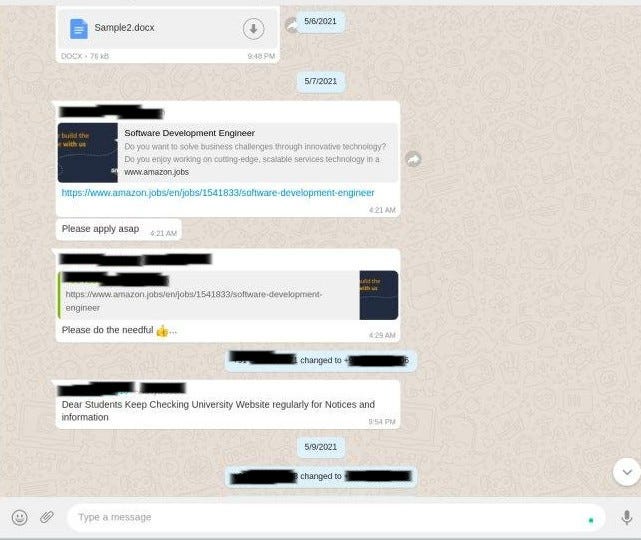
These are the messages which were on my device and when I opened WhatsApp web on the Edge Browser on my laptop I was able to see them there as well.
Now I deleted the message with the Amazon link from my device and then refreshed the Whatsapp Web page.

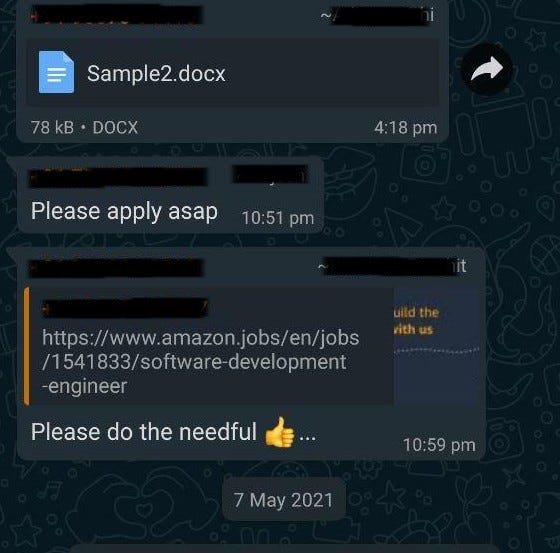

You might have noticed that the delete option was just delete for me.
The screenshot below shows the reflection of our actions on WhatsApp web with the same message deleted.
I hope you enjoyed🤗 reading this article as much as I enjoyed writing…..I mean typing. Please comment down any questions or your views on this article you have down in the comment section of the platform wherever you find the link to this article.
Before you leave here is something you can try. Whatsapp says in its privacy policy:
If a message cannot be delivered immediately (for example, if the recipient is offline), we keep it in encrypted form on our servers for up to 30 days as we try to deliver it. If a message is still undelivered after 30 days, we delete it.
Now you can try to send a message to someone who is not using WhatsApp and ask them to install it after 30 days of sending that message. What will happen?
Stay Curious🦝 .
Originally published at https://dev.to on May 22, 2021.
Scaling a high-growth Shopify brand?
Skip fragile apps. Build custom Liquid.
We engineer custom Shopify themes, tailored sections, and high-converting store architectures for brands that refuse to compromise on design, speed, or autonomy.
Keep Reading
Related Engineering Articles
Why WhatsApp web doesn't work without WhatsApp on your mobile app?
On and off this question might have crossed your mind once in a while when you open WhatsApp on the w...
How to change/delete/remove an existing remote URL in Git?
Welcome to my another blog on GitHub. I’m a fan of it and trying to dive deeper and deeper into it so as to get the best out of it. I try to simplify things as ...